中文版
中文版

 Phone:
  Email:
  WhatsApp:
 Description
- Model: YS1700-000-A34
- Brand: Yokogawa
- Series: YS1000
- Core Function: Runs programmable process-control sequences
- Type: Programmable Indicating Controller
- Key Specs: 100 VAC / 24 VDC common supply, Ethernet Modbus/TCP, dual-CPU architecture
Product Introduction
The YS1700 is Yokogawa’s programmable indicating controller for process-control applications. The specified -000-A34 configuration is the basic type with a 100 VAC / 24 VDC common power supply and Ethernet communication using Modbus/TCP. It can run user programs and is intended for panel-mounted control, indication, monitoring, and calculation tasks.
The useful engineering detail is the architecture. Two CPUs handle control and display functions separately, while the controller uses nonvolatile memory instead of a battery or capacitor for program backup. Ethernet is an optional feature, and Yokogawa confirms that the /A34 interface supports configuration through Ethernet as well as Modbus/TCP communication.
Key Technical Specifications
| Parameter | Specification |
|---|---|
| Model | YS1700-000-A34 |
| Manufacturer | Yokogawa Electric |
| Product Type | Programmable Indicating Controller |
| Series | YS1000 |
| Basic Type | Basic type, suffix -0 |
| Power Supply | 100 VAC / 24 VDC common power |
| Communication | Ethernet, Modbus/TCP |
| CPU Architecture | Dual CPU: control CPU + display CPU |
| Backup Memory | Nonvolatile memory |
| Display | Front-panel process indication and operation |
| Mounting | Panel mount |
| Front Protection | IP54 for basic type |
| Ethernet Interface | 10BASE-T / 100BASE-TX, RJ45 |
| Programming Tool | YSS1000 software |
| Certification | CE for applicable basic-type configurations; additional approvals depend on ordered options |
Yokogawa’s current specification identifies /A34 as Ethernet communication using Modbus/TCP. The basic YS1700 type also supports a 100 VAC / 24 VDC common power supply, while 220 VAC operation requires a different power specification.
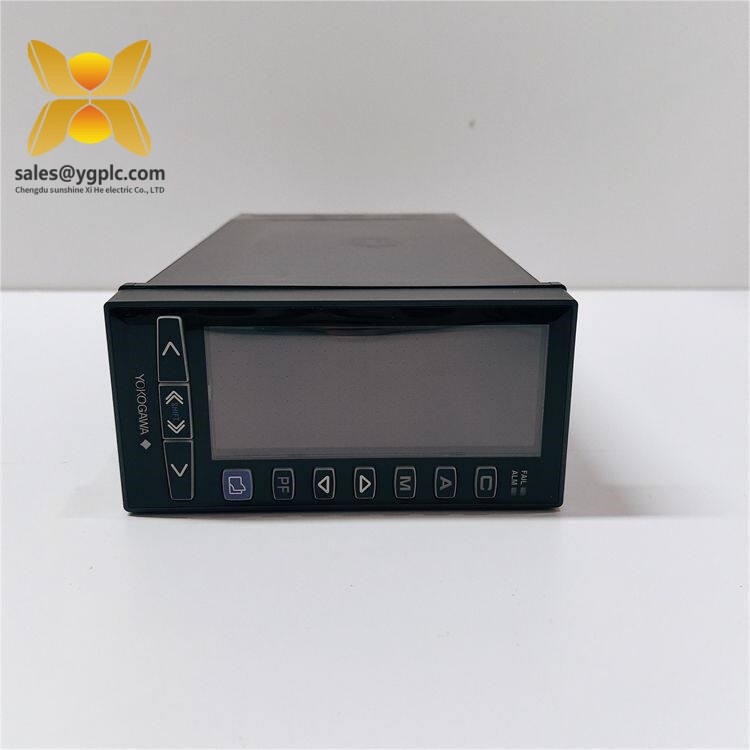
YOKOGAWA YS1700-000-A34
Application and Selection Notes
The controller fits applications where a compact programmable controller must also provide local operator indication. Typical installations include process skids, temperature and flow control, utility systems, packaged equipment, and legacy instrumentation panels.
The Ethernet option is the important part for system integration. With /A34, engineers can configure the controller over Ethernet and use Modbus/TCP for supervisory communication. Yokogawa states that Ethernet cannot simply be added later in the field; a controller without /A34 must be returned to Yokogawa for the retrofit.
That makes the complete suffix worth checking before purchase. Two units can both carry the YS1700 name and still have different communication or direct-input options.
Advantages and Limitations
Advantages
- Programmable process-control capability
- Dual-CPU architecture for control and display functions
- 100 VAC / 24 VDC common supply
- Ethernet communication with Modbus/TCP
- Nonvolatile memory without a backup battery
- Front-panel indication and operator controls
- Suitable for replacement of earlier Yokogawa controller families
Limitations
This is a controller, not a general-purpose high-density PLC. I/O capacity and direct-input functions depend on the ordered configuration. The /A34 Ethernet option also cannot be retrofitted in the field by simply installing a communication board.
For a new machine requiring large distributed I/O or extensive motion control, another PLC architecture may make more sense. For compact process loops and legacy instrumentation panels, the YS1700 format is much easier to justify.
Global Procurement and Shipping Notes
| Item | Recommended Handling |
|---|---|
| Condition | Confirm New Original / New Surplus / Refurbished |
| Stock Status | Verify physical stock before PO |
| Lead Time | Based on actual warehouse availability |
| Warranty | State clearly on quotation and PI |
| Export Packaging | ESD protection with shock-resistant carton |
| Commercial Invoice | Use complete model and actual condition |
| Packing List | Include quantity, net/gross weight and dimensions |
| COO | Provide when required by destination customs |
| Shipping | Air courier for urgent MRO requirements |
| Incoterms | FCA, EXW, FOB, or DAP as agreed |
For cross-border shipments, keep the complete configuration code on the Commercial Invoice and Packing List. A vague description such as “controller board” can create avoidable questions during customs inspection. Country of origin should also be based on the actual product documentation, not assumed from the seller’s shipping location.
Quality Inspection and Test SOP
1. Inbound inspection
Verify source traceability, serial number, nameplate, packing documentation, and option code. Inspect the housing and terminals for corrosion, scratches, yellowing, impact damage, or repair marks. Check included accessories against the supplied documentation.
2. Live test
Use a compatible Yokogawa YS1700 test setup. Check power-up diagnostics, display operation, programmable functions, Ethernet link status, Modbus/TCP communication, analog inputs, and outputs where supported by the exact configuration. Record results in a Test Report.
3. Electrical testing
Check grounding continuity and applicable insulation requirements. Do not apply a generic 500 V insulation test across electronic circuits unless the manufacturer’s procedure specifically permits that test.
4. Firmware and configuration verification
Record firmware and hardware revisions where accessible. Back up user-program information and photograph terminal wiring or configuration settings before removing an installed controller.
5. Final QC and packaging
After test completion, place the unit in an ESD bag, add protective cushioning, use a suitable outer carton, and attach a QC Passed label with the inspection date. Test photos or video can be supplied when the corresponding inspection has actually been performed.
Common Replacement Risks
Firmware or configuration mismatch: The controller may power up correctly but still behave differently if the user program or parameter set does not match the installed process. Back up the original configuration before replacement.
Ethernet option mismatch: /A34 is a specified hardware option. It is not interchangeable with /A31 RS-485 or /A32 DCS-LCS simply because all three are communication options.
Power-supply mistake: The -000 configuration uses the common 100 VAC / 24 VDC supply. A 220 VAC version uses a different power specification. Check the full ordering code before energizing the unit.
Direct-input mismatch: Thermocouple, RTD, mV, potentiometer, and transmitter-input options are separately specified. Do not assume an unlisted direct-input option is included.
ESD: Use a grounded wrist strap and ESD-safe work surface. This is basic practice, but it is still one of the easiest mistakes to avoid.
And photograph the old terminal arrangement before removal. Ten seconds now can save a long commissioning session later.
Related Models
YS1500: Yokogawa indicating controller for process applications, sharing several YS1000-family concepts and communication options.
YS1700 with /A31: Communication variant using RS-485 for PC-link, Modbus, YS protocol, and peer-to-peer communication.
YS1700 with /A32: Communication variant supporting DCS-LCS communication for compatible Yokogawa control architectures.
YS1700 with direct-input options: Versions can be specified with mV, thermocouple, RTD, potentiometer, isolator, transmitter, or frequency inputs.
Quick Conclusion
- Programmable Yokogawa process controller from the YS1000 family.
-000identifies the basic type with 100 VAC / 24 VDC common power./A34provides Ethernet communication using Modbus/TCP.- Dual CPUs separate control and display processing.
- Nonvolatile memory avoids dependence on a backup battery.
- Best suited to process-control panels and compatible legacy Yokogawa installations.
- Selection rule: match the complete ordering code, not just the YS1700 family name.
FAQ
What is the YOKOGAWA YS1700-000-A34?
It is a programmable indicating controller configured as a basic YS1700 type with Ethernet Modbus/TCP communication.
What does /A34 mean?
/A34 specifies Ethernet communication using Modbus/TCP. The Ethernet connection uses a 10BASE-T/100BASE-TX RJ45 interface.
What power supply does the -000 version use?
The basic -000 configuration uses a common 100 VAC / 24 VDC power supply. A 220 VAC version requires a different power-code configuration.
Can Ethernet be added later?
Not as a normal field retrofit. Yokogawa states that the /A34 Ethernet option cannot be added to an existing controller in the field; the unit must be returned to Yokogawa for the retrofit.
What software is used to configure it?
Yokogawa provides YSS1000 programming software for the YS1000 series. With /A34, configuration can be performed over Ethernet.
Is it suitable as a direct replacement?
Potentially, but the complete suffix, power supply, direct-input configuration, communication option, user program, and wiring must match the existing installation. Physical fit alone is not enough.