中文版
中文版

 Phone:
  Email:
  WhatsApp:
 Description
- Model: TC-FXX10
- Brand: Honeywell
- Series: Experion PKS
- Core Function: Honeywell control-system communication/interface hardware
- Type: Communication / Interface Module
- Key Specs: Experion PKS platform; chassis-mounted architecture; Honeywell proprietary system interface
⚠️ Identification note: Public technical references for the exact TC-FXX10 designation are limited. The model should be matched against the nameplate, full part number, chassis type, and Honeywell system documentation before technical specifications are released.
Product Introduction
Honeywell TC-FXX10 is identified by its part designation as Honeywell Experion PKS-related control hardware. Publicly available references do not provide enough verified information to safely assign detailed electrical, network, or I/O specifications to this exact model.
For procurement and spare-parts control, the safest approach is to use the complete nameplate information rather than infer specifications from visually similar Honeywell modules. Do not substitute an unverified equivalent solely because the connector layout or model prefix appears similar.
Key Technical Specifications
| Parameter | Specification |
|---|---|
| Manufacturer | Honeywell |
| Model | TC-FXX10 |
| Product Family | Experion PKS-related hardware |
| Module Type | Communication / Interface module — identification should be confirmed |
| System Compatibility | Honeywell system-specific |
| Installation | Chassis/system dependent |
| Network Interface | Not verified from reliable public documentation |
| Power Supply | Not verified |
| Operating Temperature | Not verified |
| Dimensions | Not verified |
| Weight | Not verified |
| Firmware / Revision | Revision dependent; verify nameplate |
Engineering note: The exact technical characteristics of TC-FXX10 could not be verified from reliable public sources. Avoid publishing guessed values for voltage, communications protocol, channel count, dimensions, or temperature range.
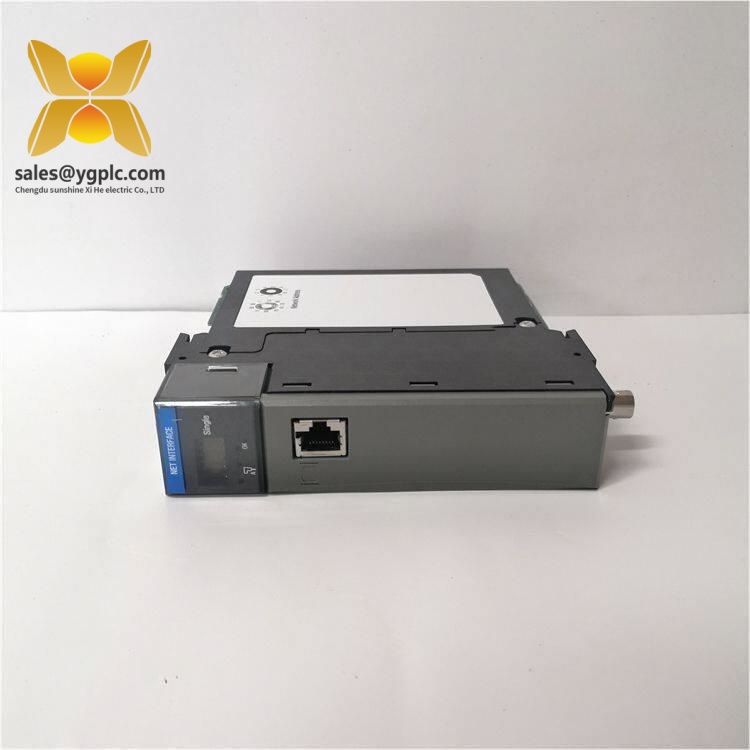
Honeywell TC-FXX10
Installation & Configuration Guide
Stage 1 — Pre-Installation
Estimated time: 10 minutes
⚠️ Follow the site’s Honeywell maintenance and electrical isolation procedure.
- Confirm the exact replacement model from the module nameplate.
- Record the serial number and hardware revision.
- Photograph the installed module and surrounding chassis.
- Record all cable positions before disconnection.
- Apply ESD protection before handling the replacement.
Stage 2 — Remove Existing Module
Estimated time: 5–10 minutes
- Place the control system in the approved maintenance state.
- Isolate power where required by the Honeywell installation procedure.
- Label every connected cable.
- Remove the module using the chassis retention mechanism.
- Inspect the backplane connector for contamination or bent pins.
Stage 3 — Install Replacement
Estimated time: 5–10 minutes
- Confirm the replacement part number again.
- Check the hardware revision against the existing module.
- Position the module correctly in the designated chassis location.
- Seat the module without forcing the backplane connector.
- Restore wiring exactly according to the photographs and approved drawings.
Stage 4 — Commissioning
Estimated time: 10–20 minutes
- Restore power according to the site procedure.
- Check module status indicators, where applicable.
- Verify that the Honeywell system recognizes the hardware.
- Check communication status and active diagnostics.
- Confirm that the control application returns to the expected operating state.
- Record the new serial number and revision in the maintenance log.
⚠️ Important: Because the exact function and configuration requirements of TC-FXX10 are not sufficiently documented in the available public sources, the original Honeywell hardware manual should be used for final installation, wiring, and commissioning instructions.
Frequently Asked Questions
1. What is Honeywell TC-FXX10?
TC-FXX10 appears to be a Honeywell control-system hardware designation associated with the Experion PKS environment. However, the exact module function cannot be confirmed reliably from public documentation currently available.
2. What is the full Honeywell part number?
The supplied identification is TC-FXX10. Check the physical nameplate for additional suffixes, revision codes, or assembly numbers before placing an order.
3. Can TC-FXX10 be used as a direct replacement?
Not automatically. Verify the complete part number, chassis compatibility, hardware revision, firmware requirements, and wiring before installing a replacement.
4. What voltage does TC-FXX10 use?
The applicable supply specification has not been verified from a sufficiently reliable source. Do not assume 24 V DC based on other Honeywell modules.
5. Does it support Ethernet or another communication protocol?
This cannot be confirmed from the available public references for the exact TC-FXX10 model. The installed system documentation should be checked before making a network-compatibility decision.
6. Is TC-FXX10 obsolete?
A reliable public source confirming the lifecycle status of this exact model was not found. Treat availability as stock-dependent until Honeywell lifecycle information or an authorized documentation source confirms its status.
7. What information should I provide when requesting a quotation?
Provide the complete model number, nameplate photograph, hardware revision, serial number, system/chassis model, required quantity, and required condition (New Original, New Surplus, or Used). This is much safer than quoting the short model designation alone.