中文版
中文版

 Phone:
  Email:
  WhatsApp:
 Description
- Model: CC-IP0101
- Brand: Honeywell
- Series: Experion PKS / Series 8
- Core Function: PROFIBUS DP gateway communication
- Type: PROFIBUS DP Gateway Module
- Key Specs: Up to 12 Mbps; up to 127 PROFIBUS DP devices; supports two DP networks per module.
Product Introduction
Honeywell CC-IP0101 is a PROFIBUS DP Gateway Module used to connect PROFIBUS field devices with Honeywell Experion PKS control systems. It is associated with the C300/Series 8 architecture and provides the communication path required for integrating PROFIBUS devices into the DCS environment.
For process plants using drives, remote I/O, instruments, or other PROFIBUS DP devices, the module supports transmission rates from 9.6 kbps up to 12 Mbps and can handle up to 127 devices on a PROFIBUS network. It also supports two DP networks per module, depending on the configured architecture.
Key Technical Specifications
| Parameter | Specification |
|---|---|
| Manufacturer | Honeywell |
| Model | CC-IP0101 |
| Part Number | 51410056-175 |
| Product Type | PROFIBUS DP Gateway Module |
| Product Family | Experion PKS / Series 8 |
| Compatible Controller | Honeywell C300 |
| Protocol | PROFIBUS DP |
| Maximum Baud Rate | 12 Mbps |
| Supported Devices | Up to 127 PROFIBUS DP devices |
| DP Networks | Up to 2 per module |
| Power Supply | 24 V DC, depending on system configuration |
| Dimensions | Approx. 190 × 69 × 23 mm |
The 51410056-175 association, C300 compatibility, PROFIBUS speed range, and two-network capability are supported by available product references. Some third-party listings report different environmental and power figures, so those values should be verified against the exact hardware revision and Honeywell documentation before installation.
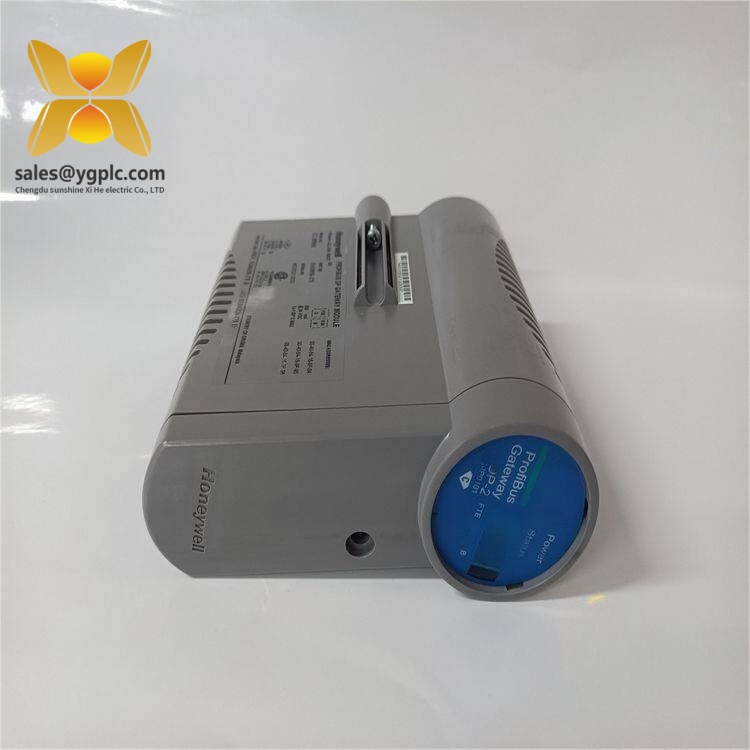
Honeywell CC-IP0101
Installation & Configuration Guide
Stage 1 — Pre-Installation
Estimated time: 10 minutes
⚠️ Safety first. Follow the site’s approved DCS maintenance and isolation procedure.
- Notify the operations team of the planned maintenance window.
- Confirm the process is in a safe state.
- Follow the approved power-isolation procedure before removing the module.
- Wear an ESD wrist strap and work on an antistatic surface.
- Photograph the existing module, PROFIBUS connections, rack position, and configuration.
- Record the existing firmware/hardware revision if available.
- Back up the current Experion configuration before making changes.
Do not assume that two modules with similar labels have identical revisions. Record the exact identification before removal.
Stage 2 — Remove the Existing Module
Estimated time: 5 minutes
- Confirm the module location in the C300/Series 8 assembly.
- Label the connected PROFIBUS cable and any associated connections.
- Carefully disconnect the fieldbus connection.
- Release the module according to the applicable Series 8 mounting procedure.
- Remove the module without forcing the backplane or connector.
- Inspect the connector for bent pins, contamination, or mechanical damage.
⚠️ Do not pull on the cable itself. Use the connector hardware.
Stage 3 — Install CC-IP0101
Estimated time: 5–10 minutes
- Verify the model and part number before installation.
- Compare the replacement hardware revision with the removed unit.
- Install the module in the correct Series 8/C300 position.
- Confirm that the module is fully seated.
- Reconnect the PROFIBUS interface.
- Check the network termination arrangement.
- Verify cable shielding and grounding according to the site wiring standard.
For PROFIBUS networks, termination is particularly important. A common field mistake is adding termination at an intermediate node rather than only at the appropriate ends of the bus.
Stage 4 — Configuration and Testing
Estimated time: 10–15 minutes
- Restore system power according to the approved startup sequence.
- Check module status LEDs.
- Open the applicable Experion engineering/configuration environment.
- Verify that the gateway is recognized.
- Confirm the configured PROFIBUS network parameters.
- Check the configured slave/device addresses.
- Confirm communication with representative PROFIBUS devices.
- Review diagnostic information for communication errors.
- Return the controller/system to normal operation.
- Monitor the system for at least 30 minutes.
⚠️ Do not change PROFIBUS addresses casually. A duplicated address can prevent normal communication even when the physical wiring is correct.
Common Failure Risks
1. PROFIBUS Address Conflict
Two devices cannot simply share the same configured address.
Check: Compare the device list in the engineering configuration with the actual field device addresses.
2. Incorrect Bus Termination
A termination error can produce intermittent communication faults that are difficult to diagnose.
Check: Verify termination against the actual network topology before replacing the gateway.
3. Hardware/Firmware Revision Mismatch
A replacement module may have a different hardware revision or firmware requirement.
Check: Record the old revision before purchasing. If the revision differs, confirm compatibility with the installed Experion/C300 release.
4. Incorrect Cable or Shielding
PROFIBUS is sensitive to installation quality.
Check: Inspect cable routing, connector condition, shielding, and grounding. Do not rely only on continuity testing.
5. ESD Damage
Fieldbus modules contain electronic circuitry that can be damaged during handling.
Check: Use an ESD wrist strap and antistatic work surface during replacement.
FAQ
1. What is Honeywell CC-IP0101 used for?
It is a PROFIBUS DP Gateway Module used with Honeywell Experion PKS/C300 architectures to connect PROFIBUS devices to the DCS.
2. What is the maximum PROFIBUS communication speed?
Available references specify a range from 9.6 kbps to 12 Mbps.
3. How many PROFIBUS devices can it support?
The commonly cited specification is up to 127 PROFIBUS DP devices, subject to the actual network architecture and configuration.
4. Is CC-IP0101 compatible with Honeywell C300?
Yes. Current technical listings identify it as a PROFIBUS interface/gateway module for the Honeywell Experion PKS C300 environment.
5. Is CC-IP0101 the same as a standard digital I/O module?
No. It should be treated as a fieldbus communication/gateway module, not as a conventional discrete I/O module. Honeywell’s own system documentation specifically identifies CC-IP0101 as a Profibus Gateway Module (PGM).
6. Can I replace my existing module directly?
It depends on the installed C300/Experion release, hardware revision, and network configuration. Match the exact part number and revision first, then verify the firmware/software compatibility before installation.
7. What should I confirm before purchasing?
Provide the supplier with the complete model, part number, hardware revision, current system/Experion release, and required condition (New Original or other). This reduces the chance of receiving a physically similar but configuration-incompatible spare.