中文版
中文版

 Phone:
  Email:
  WhatsApp:
 Description
- Model: 1C31169G02
- Brand: Emerson
- Series: Ovation Link Controller
- Core Function: Provides RS-485 serial communication
- Type: Personality Module (PMOD)
- Key Specs: RS-485; RS-422 compatible; 1 serial port
- Associated Electronics Module: 1C31166G01
- System: Emerson Ovation DCS
- Condition: Verify New Original / New Surplus / Refurbished before purchase
- Stocking Recommendation: Min 1 / Max 2 for critical legacy Ovation systems
The Emerson Ovation reference manual identifies 1C31169G02 specifically as the RS-485 Personality Module, and notes that it may also be used for an RS-422 serial link. It works with electronics module 1C31166G01.
Product Introduction
Emerson 1C31169G02 is the RS-485 Personality Module used with the Ovation Link Controller. It provides one serial communication port and is paired with the 1C31166G01 Electronics Module for communication with third-party equipment or systems.
For legacy Ovation installations, this small PMOD matters because the communication interface is defined by the personality module. The documented configuration is RS-485 four-wire, with RS-422 also supported; it is not the RS-232 version, which uses 1C31169G01 instead.
Key Technical Specifications
| Parameter | Specification |
|---|---|
| Manufacturer | Emerson Process Management |
| Model | 1C31169G02 |
| Product Family | Ovation |
| Product Type | Personality Module (PMOD) |
| Module Function | Link Controller serial interface |
| Serial Interface | RS-485 |
| Alternate Interface | RS-422 |
| Serial Ports | 1 |
| Associated EMOD | 1C31166G01 |
| System Application | Emerson Ovation DCS |
| Link Type | Four-wire serial link |
| Controller Requirement | Appropriate SLC algorithm in Ovation Controller |
| RS-232 Equivalent | 1C31169G01 |
| Installation | Ovation Link Controller base assembly |
| Lifecycle | Legacy Ovation hardware; verify availability and revision |
The Ovation documentation lists 1C31169G02 as the PMOD for the RS-485/RS-422 four-wire Link Controller configuration.
Installation & Configuration Guide
Estimated engineering time: 25–30 minutes, assuming the existing Ovation configuration and replacement hardware are already verified.
Phase 1: Pre-Installation — 10 minutes
⚠️ Follow the site’s LOTO and approved DCS maintenance procedure.
- Notify the control-room operator and production team.
- Confirm the affected serial link and connected third-party equipment.
- Place the process in the approved maintenance state.
- Isolate power according to the installed Ovation hardware procedure.
- Wear an ESD wrist strap and use an ESD-safe work surface.
Before removal, photograph:
- 1C31169G02 nameplate
- Electronics-module identification
- Base-unit wiring
- Serial cable connections
- Keying positions
- Existing module orientation
Save the current Ovation configuration before changing hardware.
Phase 2: Remove the Existing PMOD — 5 minutes
- Confirm that the affected link is isolated.
- Record every cable and terminal position.
- Release the module from the base assembly.
- Remove the PMOD carefully.
- Inspect the mating contacts for contamination or mechanical damage.
Do not confuse 1C31169G02 with 1C31169G01. The G01 version is associated with RS-232, while G02 is the RS-485/RS-422 version.
Phase 3: Install the Replacement — 5 minutes
- Remove the replacement from its ESD packaging.
- Verify 1C31169G02 on the nameplate.
- Compare the keying and mechanical arrangement with the old unit.
- Install the PMOD into the correct Link Controller base.
- Reconnect the serial wiring using the original terminal documentation.
- Check that no conductor is loose.
The Ovation Link Controller architecture uses a base unit, Electronics Module, and Personality Module. The base unit provides field termination.
Phase 4: Communication Test — 10 minutes+
- Restore power according to the approved procedure.
- Verify Link Controller diagnostics.
- Confirm the serial interface configuration.
- Check RS-485 communication with the connected device.
- Confirm expected data exchange.
- Review Ovation controller diagnostics.
- Check for communication errors or timeout indications.
- Verify the third-party system receives the expected data.
- Record the replacement serial number and revision.
Do not change baud rate, parity, termination, or addressing simply because communication does not start. Compare the existing configuration first.
Quality Inspection & Test Process
For an inventory spare, use a controlled inspection sequence.
1. Inbound Inspection
- Verify supplier traceability.
- Check the nameplate and part number.
- Record the serial number where present.
- Inspect for corrosion, scratches, repair marks, or discoloration.
- Check packaging condition.
- Verify associated hardware where supplied.
2. Live Functional Test
Use a compatible Ovation Link Controller test environment where available.
Test:
- Module recognition
- Serial interface operation
- RS-485 communication
- RS-422 communication where applicable
- Data exchange with a known test device
- Diagnostic status
Record the results in a Test Report.
3. Electrical Checks
- Verify applicable supply conditions at the complete Link Controller assembly.
- Check grounding continuity where applicable.
- Inspect connector integrity.
- Perform dielectric or insulation testing only when permitted by the manufacturer’s procedure.
4. Configuration Verification
Record:
- PMOD model
- EMOD model
- Hardware revision
- Serial interface type
- Communication settings
- Keying configuration
5. Final QC & Packaging
- QC inspector sign-off
- ESD bag
- Bubble wrap
- Protective carton
- QC Passed label
- Inspection date
Test photos and videos can be supplied when available.
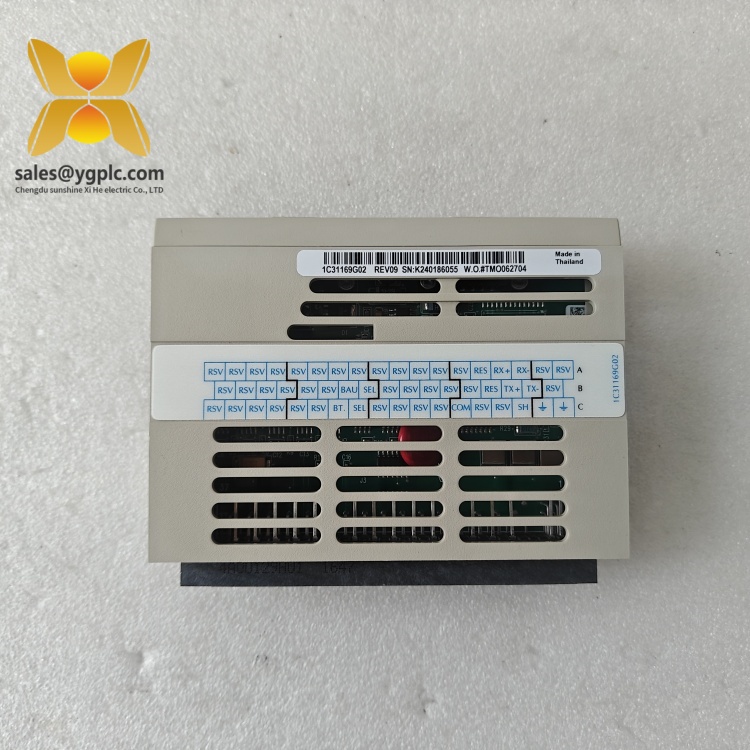
Emerson 1C31169G02
Technical Replacement Risks
1. RS-232 vs RS-485 Confusion
This is the big one.
1C31169G01 = RS-232.
1C31169G02 = RS-485 / RS-422.
The Ovation reference manual explicitly separates these two personality modules.
A similar-looking card does not mean an interchangeable interface.
2. Wrong Electronics Module
The documented G02 configuration uses 1C31166G01 as the Electronics Module.
Before ordering, verify the EMOD and PMOD as a pair.
3. Serial Configuration Mismatch
Check:
- Baud rate
- Parity
- Data bits
- Stop bits
- Station/address settings
- RS-485 wiring
- Termination arrangement
One wrong parameter can look like a failed module.
4. Wiring Errors
RS-485 is particularly unforgiving of incorrect polarity and termination.
Photograph the old wiring before disconnecting anything.
Then compare the replacement connection point by point.
5. Incorrect Ovation Configuration
The reference manual states that the Link Controller requires the appropriate SLC algorithm in the Ovation Controller.
Replacing the PMOD alone may not restore communication if the controller-side configuration is incorrect.
Inventory & Total Cost of Ownership
This is a slow-moving legacy spare, not a normal consumable.
For one critical Ovation system:
| Situation | Suggested Stock | Inventory Strategy |
|---|---|---|
| One critical serial link | Min 1 / Max 1 | On-site insurance spare |
| Several identical Ovation systems | Min 1 / Max 2 | Centralized buffer stock |
| Low-criticality application | 0 on-site | Vendor-held stock |
| Long procurement lead time | 1–2 units | Strategic buffer |
| EOL exposure | 1–2+ units | Last-time-buy assessment |
Emerson’s own Ovation spare-parts material describes factory-certified replacement parts as a way to reduce downtime and maintain control-system integrity.
For this type of legacy PMOD, obsolescence risk can outweigh normal usage frequency. Holding one tested unit may cost less than emergency sourcing after an unexpected serial-link failure.
Frequently Asked Questions
1. What is Emerson 1C31169G02 used for?
It is the RS-485 Personality Module for the Ovation Link Controller. The documented configuration uses one serial port and supports RS-485, with RS-422 also available.
2. Is 1C31169G02 the same as 1C31169G01?
No.
| Model | Interface |
|---|---|
| 1C31169G01 | RS-232 |
| 1C31169G02 | RS-485 / RS-422 |
Do not substitute one for the other without checking the system design.
3. Can I use 1C31169G02 by itself?
Not as a complete Link Controller.
The documented Ovation configuration pairs the PMOD with 1C31166G01 as the Electronics Module. The complete assembly also uses the appropriate base unit.
4. My Ovation system has no RS-485 communication after replacement. What should I check?
Use this order:
- Confirm the PMOD is 1C31169G02.
- Verify the associated EMOD.
- Check serial wiring and polarity.
- Compare communication parameters with the original configuration.
- Check the SLC algorithm and Ovation configuration.
- Review controller diagnostics.
Changing multiple parameters at once makes the fault harder to isolate.
5. Is 1C31169G02 still available?
Yes, aftermarket inventory is still listed by several industrial automation suppliers, although availability varies. One current listing identifies it as an Ovation Serial Link Controller component and offers stock and warranty options.
For procurement, request the actual nameplate photo, hardware revision, condition, and test evidence before placing an order.
6. What should I keep as a spare?
For a critical Ovation serial link, one tested spare is the practical minimum. If multiple identical systems share the same configuration, two centrally controlled units can provide better capital efficiency.
That is usually more sensible than buying several units that may sit unused for years.